A Professional's Take on the New Asus ProArt P16 H7606Wx Laptop
Introduction
The Asus ProArt P16 H7606Wx arrives into a crowded market of mobile workstations and creator-focused laptops with a clear brief: deliver desktop-class performance in a portable 16-inch package while prioritizing color accuracy and a workflow-friendly feature set. For professionals who edit photos and video, design for print, color grade, or run compute-heavy creative tasks, the ProArt line has become a recognizable option. This article examines the P16 H7606Wx from a practitioner's perspective — assessing display quality, performance, thermals, I/O, ergonomics, and day-to-day suitability for real-world workflows. It aims to help buyers decide whether this unit meets the needs of content creators, designers, and technical professionals who demand reliability and accurate visual output.
Product Review and Analysis
Design, Build Quality, and Portability
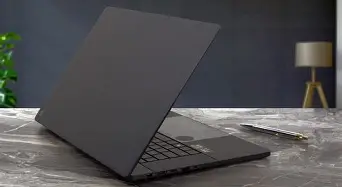
Asus designs the ProArt P16 to feel purposeful: a robust chassis with a matte finish, subtle branding, and a hinge that lifts the rear slightly for better airflow and typing angle. The build balances durability with portability — it is not an ultra-light laptop but remains comfortable for professionals who travel between studios and client sites. The 16-inch footprint gives more screen real estate while keeping the whole unit more portable than larger desktop replacements.
Professionals care about the durability of hinges, the quality of the keyboard, and serviceability. The P16 typically offers user-accessible panels for RAM and storage upgrades on many SKUs, which is an advantage for teams that maintain assets over several years. The keyboard provides a firm keypress and a pragmatic layout (full-size keys, dedicated function row); the touchpad is satisfactory for navigation and multi-touch gestures, while many will pair the laptop with a dedicated mouse for extended editing sessions.
Display: The Core Proposition for Creators
The ProArt family succeeds or fails on its displays, and Asus targets this laptop squarely at color-critical work. The P16 variant emphasizes a 16-inch panel with a high-resolution option and factory calibration. Typical strengths include wide color gamut coverage (often close to or at 100% of DCI-P3), low Delta E out of the box, and options for touch or anti-glare finishes depending on configuration. For photographers, print designers, and colorists, the presence of hardware or factory calibration and a validated color profile is a meaningful benefit — it reduces the time spent calibrating and increases confidence when handing deliverables to clients or print houses.
For video editors, the 16:10 (or similar) aspect ratio is more practical than 16:9: it provides extra vertical workspace for timelines and tool palettes. Panel brightness and contrast are adequate for indoor studio use and controlled environments; for heavy exterior work in bright sunlight, an external monitor or shade remains necessary.
Performance: CPU, GPU, and Real-World Throughput
Asus positions the P16 H7606Wx with professional users in mind, so configurations commonly include high-performance H-series processors and professional or prosumer GPUs. In daily use, the platform handles multitasking — large RAW photo libraries, layered compositions in Photoshop, timeline-heavy edits in Premiere Pro, and multi-application workflows — without perceptible slowdowns when configured with sufficient RAM and fast SSD storage.
GPU choice matters: creators working with GPU-accelerated editing, color grading, 3D rendering, or machine learning workloads should prioritize higher-tier GPUs or professional-class variants when available. For long GPU render passes, thermal behavior and sustained performance are as important as peak numbers; the laptop's cooling solution typically balances fan noise against sustained throughput, but users running prolonged renders will want to tune performance profiles or connect to a docked workstation with better cooling for extremely heavy tasks.
Thermals and Noise
A laptop that can push high-end CPUs and GPUs must manage heat. The ProArt P16 generally uses a vapor chamber/heat pipe arrangement and multiple intake/exhaust vents to move thermal energy away from critical components. Under short bursts of demanding work, it can achieve strong performance with moderate fan noise. Under sustained loads — long 4K export jobs or extended 3D renders — the fans ramp more noticeably and the chassis can become warm to the touch. Adaptive performance modes and Asus' thermal management utility allow users to prioritize quieter operation or higher sustained throughput depending on the environment.
I/O and Expandability
Professionals frequently ask: does it have the right ports? The P16 typically covers the essentials: multiple USB-A and USB-C ports (with at least one Thunderbolt or USB4-capable port on Intel-based models), HDMI for external displays, a full-size SD card reader (important for photographers), and a 3.5mm audio jack. LAN ports are rare on slim units, so teams relying on wired networking will prefer a USB-C Ethernet adapter or a docking station. Expandability often includes user-replaceable M.2 NVMe storage slots and RAM slots on serviceable models, which extends the usable life of the machine.
Looking for the best Laptops & Computers deals on Amazon?
Browse Now →Battery Life and Mobility
Battery life for a performance-oriented 16-inch laptop is necessarily a trade-off. In mixed-use scenarios (web, email, light editing), users can expect a workday's worth of battery depending on brightness and power profile. Under heavy creative workloads, expect significantly reduced runtimes and the need for AC power during intensive sessions. However, the battery is typically good enough for untethered review sessions, client meetings, and short-flight editing when paired with power management strategies (lower brightness, optimized power profiles).
Software, Calibration, and Color Tools
Asus bundles utilities for display calibration and system tuning. For professionals, the presence of factory calibration and compatibility with third-party calibration hardware matters a great deal. The P16 supports ICC profiling workflows and, where present, Pantone validation or similar certifications are useful signposts for buyers who need consistent color across devices and print outputs. The MyAsus utility and built-in performance modes help streamline task-specific tuning without deep BIOS adjustments.
Real-World Use Cases
- Photographers: Efficient for culling, RAW processing, and batch exports when paired with enough RAM and a fast NVMe SSD. The SD card reader speeds ingest and a color-accurate panel reduces the need to cross-reference multiple devices.
- Video editors and colorists: A good choice for editors working on short to medium-length projects. GPU acceleration in editing suites benefits from stronger GPU options; the 16-inch display is helpful for timelines, although a reference monitor is recommended for final grading.
- 3D artists and motion designers: Responsive in viewport work and rendering, but serious render farms or desktop workstations will still be required for very large scenes or long-form animation renders.
- Designers and print professionals: Pantone/ICC-validated displays and high DCI-P3 coverage support print output workflows; calibration tools save time and reduce surprises in the proofing stage.
- Developers and technical professionals: The P16 is a practical developer workstation — plenty of CPU power for local builds and containers, and the extra screen area improves code window management.
Pros & Cons
- Pros:
- High-quality, color-accurate 16-inch display tailored for creative work
- Configurable with high-performance H-series CPUs and capable GPUs
- Practical port selection including card reader and Thunderbolt/USB4
- Serviceable design with upgradeable storage and RAM (depending on SKU)
- Thoughtful keyboard layout and professional build quality
- Cons:
- Battery life is limited under sustained creative loads
- Under heavy sustained workloads, fans can become loud and chassis warm
- Higher-tier configurations push the price toward desktop-replacement territory
- For absolute color-critical grading, an external calibrated reference monitor is still recommended
Comparison
The table below compares the ProArt P16 H7606Wx against two common alternatives for creators: a high-end Apple MacBook Pro 16 with Apple silicon and a Windows-based mobile workstation like Dell's Precision or Lenovo's ThinkPad P-series. These are generalized comparisons focusing on attributes buyers typically weigh: display, GPU suitability for creative software, expandability, and portability.
| Feature | Asus ProArt P16 H7606Wx | MacBook Pro 16 (Apple silicon) | Windows Mobile Workstation (Dell/Lenovo) |
|---|---|---|---|
| Display | 16-inch color-calibrated options, wide gamut (DCI-P3), factory calibration | Excellent HDR-capable Mini-LED; superb color and brightness | High-quality panels available; vary by model and color validation |
| Performance (CPU) | H-series processors for strong multi-threaded performance | Apple silicon excels in optimized workloads and efficiency | H- or Xeon-class CPUs with strong sustained performance |
| GPU | Discrete NVIDIA/AMD options (good for GPU-accelerated apps) | Integrated Apple GPU with excellent GPU compute for optimized apps | Professional GPUs (NVIDIA RTX A-series) available for CAD/3D |
| Ports & Expandability | Good mix: Thunderbolt/USB4, HDMI, SD reader; upgradeable RAM/SSD on many SKUs | Robust Thunderbolt/USB-C; limited internal upgradeability | Extensive I/O on many models; built for serviceability |
| Battery & Mobility | Moderate battery life; heavier under load | Excellent battery life and efficiency in many workflows | Variable; typically similar to Asus in heavy workloads |
| Best for | Color-critical creators who need a Windows ecosystem and upgradeability | Creators who value efficiency, OS integration, and app optimization | Professionals needing ISV-certified workstation performance and serviceability |
Buying Guide: Choosing the Right Configuration
Buyers should approach the P16 H7606Wx the same way they select any professional laptop: match the configuration to the workload rather than buying top-tier blindly. Below are practical considerations and recommended priorities based on typical real-world needs.
1. Prioritize the Display If Color Matters
If the primary use is photo editing, color grading, or print design, select the configuration with the factory-calibrated, highest color gamut panel. Verify the advertised gamut coverage, Delta E score, and whether the screen comes with a validated profile (Pantone or ICC). A high-resolution panel (3K/4K options) improves workspace and precision for fine retouching, but it can influence battery life and GPU load.
2. CPU: Balance Cores vs. Single-threaded Speed
Creative apps use both multi-threaded and single-threaded performance. Video encoders, some renderers, and batch processing scale well with cores; certain plugins and interactive tasks benefit from higher single-core clocks. For mixed workloads, an H-series chip with a strong balance of cores and clock speed provides the most versatility.
3. GPU: Match Software Acceleration Needs
Identify whether the software suite benefits from GPU acceleration (DaVinci Resolve, Premiere Pro, Blender, Octane, GPU-accelerated AI tools). If yes, invest in a stronger GPU. For strictly 2D work, prioritize a better display and more RAM instead.
4. RAM and Storage: Avoid Bottlenecks
For photography workflows, 32GB is a comfortable starting point; for heavy video timelines, 64GB or more is sensible. Check whether RAM is user-upgradeable — if so, buying a lower RAM SKU and upgrading later can be cost-effective. Fast NVMe storage is critical for scratch disks and active projects; consider multiple M.2 slots for internal expansion or fast external NVMe enclosures for archive work.
Shop the latest Laptops & Computers picks on Amazon.
Shop Amazon →5. Ports and Workflow Integration
Ensure the chosen SKU has the ports the buyer actually uses: an SD card reader is non-negotiable for photographers; multiple Thunderbolt ports aid connectivity for docked studio setups. Verify the presence of HDMI 2.1 or DisplayPort capability if driving multiple 4K displays or a 120Hz external monitor is required.
6. Thermals and Performance Profiles
Ask about thermal profiles and noise levels. If the user works in client-facing or quiet environments, quieter operation may be more important than raw sustained peak performance. For long renders, consider connecting to an external power source or a desk-based workstation.
7. Warranty and Support
Creative professionals value minimal downtime. Consider extended warranty and accidental damage protection, and check whether on-site repair is offered in the relevant region. If the device is used for paid client work, the cost of priority service often outweighs its premium.
8. Accessories and Color Management
Budget for a calibration device (if not included) to periodically verify the display. Consider a color-accurate external reference monitor for final proofs, a reliable external drive solution for backups, and a dock if the user needs many peripherals.
Conclusion
The Asus ProArt P16 H7606Wx is a thoughtful entry in the creator-focused laptop segment. It presents a balanced offering for those who prioritize a reliable, color-accurate display paired with the flexibility of the Windows ecosystem. For photographers, designers, and many video editors, the machine checks the key boxes: strong performance, practical port selection, and professional-grade display characteristics. The chief trade-offs are expected: battery life under heavy loads and fan noise during sustained performance runs.
Ultimately, the P16 is best considered by professionals who need a portable, color-accurate workstation that is serviceable and configurable. Buyers who require the absolute longest battery life or who depend on a single-vendor, tightly optimized app ecosystem may prefer alternative platforms. For most studio-based creators and mobile professionals who balance on-location shoots with desk work, the ProArt P16 H7606Wx is a compelling option that respects the priorities of creative workflows without hiding important compromises.