Which is Better Value? Macbook Pro 16 2021 vs Macbook Pro 14 M3 2023 Compared
Introduction
For buyers choosing a new or used professional laptop, the MacBook Pro line often represents the top of the shortlist. Two models that commonly appear in comparisons are the MacBook Pro 16 (2021) and the MacBook Pro 14 with an M3-class chip (2023). At first glance, the choice seems simple: pick the newer, smaller 14-inch model for better efficiency and a modern chip, or opt for the larger 16-inch for screen real estate and sustained performance. This article takes an objective look at real-world value: performance in daily workflows, portability, battery life, expandability, long-term usefulness, and the trade-offs buyers should consider.
How to read this comparison
This article focuses on practical outcomes rather than marketing bullet points. Each section examines the two machines through common buyer lenses—content creators, developers, business users, students, and travelers—and gives pros and cons for each model. A comparison table summarizes the key differences, followed by a buying guide that helps match buyer needs to the right laptop.
Detailed product analysis
Design and build
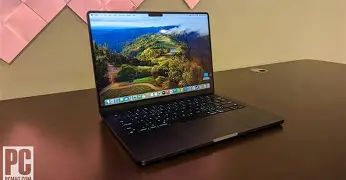
Both machines continue Apple’s focus on a premium aluminum unibody, excellent keyboards, and precise trackpads. The MacBook Pro 16 (2021) is aimed at users who prioritize a larger workspace: it has a wider chassis, larger trackpad and a bigger overall footprint that accommodates a physically larger display and a larger battery. The MacBook Pro 14 M3 (2023) trades some physical space for a more compact, travel-friendly design while retaining a similar industrial aesthetic.
In practice, the 16-inch model feels more like a desktop replacement — it sits comfortably on a desk and is less of a strain to use for long content-creation sessions without external displays. The 14-inch is easier to carry, fits into smaller laptop bags, and is friendlier for commuters and students.
Display and media
Both models use Apple’s high-quality displays with excellent color reproduction and high contrast. The 16-inch’s larger panel makes a measurable difference for timeline-based work in video editing, large spreadsheets, and multitasking with side-by-side windows. The 14-inch, despite its smaller size, still offers very high pixel density and supports the same wide color gamut, making it suitable for color-critical work.
For photographers and editors who need the most screen real estate without an external monitor, the 16-inch wins on convenience. For those who often work on the move or prefer to pair the machine with an external monitor at a desk, the 14-inch delivers nearly identical display quality in a more portable package.
Performance and thermal behavior
The 2021 16-inch MacBook Pro shipped with high-end Apple Silicon options (M1 Pro and M1 Max) designed for sustained, multi-core workloads. The MacBook Pro 14 M3 (2023) features a newer-generation Apple Silicon design focused on higher single-thread performance, improved integrated graphics efficiency, and a more modern neural engine. In everyday tasks—web browsing, productivity apps, light photo editing—both machines are essentially overpowered. The differences matter most under heavy, sustained loads like exporting long 4K timelines, large dataset training, or compilation of big codebases.
Real-world behavior: the 16-inch with a higher-tier older-generation chip and larger chassis often sustains higher multi-core throughput for longer due to better thermal headroom, making it preferable for prolonged heavy-duty rendering. The 14-inch with an M3-style chip tends to be more power efficient and delivers excellent burst performance for shorter jobs and tasks where single-core speed matters, for example interactive design work or fast compile cycles.
Discover deals on Laptops & Computers — updated daily.
Shop Amazon →Battery life and efficiency
Battery life is a combination of chassis battery size and chip efficiency. The 16-inch’s physically larger battery typically shows strong endurance in mixed workloads. The 14-inch benefits from architectural gains in the newer chip, which can translate to similar or better battery life for many everyday tasks despite a smaller battery. For users who travel and rely solely on battery power during the day, the 14-inch model often provides a better balance between runtime and weight. For users who run long rendering sessions on battery (less common), the 16-inch physically larger battery remains advantageous.
Ports, connectivity, and expansion
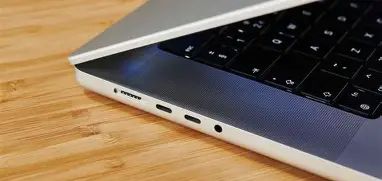
Both models reintroduced several welcomed ports (HDMI, SD card, MagSafe) compared with earlier thin MacBooks. In practical terms, the 16-inch and 14-inch offer comparable I/O, which means photographers, videographers, and creative professionals can plug in cameras, external displays, and card readers without a hub. Buyers who rely heavily on many simultaneous wired peripherals should still verify the exact port layout on a given configuration, but neither model forces users into an accessory-driven workflow.
Speakers, webcam, and microphones
Apple’s pro-line MacBooks ship with very capable speakers and microphones. The 16-inch benefits from slightly more physical space for larger speaker modules, which can translate to fuller bass and louder maximum volumes—helpful for quick video reviews and casual media consumption without external speakers. Webcam and mic quality across both models is comparable and suitable for video conferences, though professionals who need broadcast-level audio or video will still pair external devices.
Software, compatibility, and future-proofing
Both machines run macOS and have excellent integration with Apple’s software ecosystem. The 14-inch with an M3-style chip represents a newer silicon generation and therefore is somewhat more future-proof in terms of extended macOS support and access to newer silicon-specific features. That said, Apple’s M1 Pro/Max platform remains fully supported for current macOS releases and most practical workloads, so the 2021 16-inch remains viable for several years.
Buyers who require maximum longevity and want the newest architecture advantages (e.g., more advanced media acceleration or machine learning improvements) may prefer the 14-inch M3 model; buyers who value a larger working area and sustained throughput can still justify the 16-inch.
Pros & Cons
MacBook Pro 16 (2021)
- Pros: Larger display and more desktop-like workspace; better thermal headroom for sustained heavy loads; larger battery capacity favors extremely long workloads; full-size keyboard and larger trackpad; excellent speakers with richer bass.
- Cons: Heavier and less portable; older silicon generation (though still powerful) may not have the latest efficiency or single-core gains; larger footprint makes it less convenient for frequent travel.
MacBook Pro 14 (M3 2023)
- Pros: More compact and lighter for daily carry; newer silicon architecture brings improved efficiency and strong single-threaded performance; comparable display quality in a smaller package; often similar battery life in everyday use due to efficiency gains.
- Cons: Smaller screen may hinder some creative workflows without an external monitor; smaller chassis limits sustained thermal headroom slightly compared with the 16-inch; less physical presence for speakers.
Side-by-side Comparison
| Category | MacBook Pro 16 (2021) | MacBook Pro 14 (M3 2023) |
|---|---|---|
| Target buyer | Desktop-replacement users, heavy multi-hour rendering and editing workflows | Mobile professionals, students, developers, designers who travel frequently |
| Display | Larger 16-inch panel — more workspace for timelines and side-by-side apps | 14-inch high-quality panel — nearly identical color and HDR capabilities in a smaller form |
| Performance | Great sustained multi-core throughput, especially in higher-end configurations | Better efficiency, strong single-core performance, modernized media and ML acceleration |
| Battery | Large battery supports long-high-load sessions | Smaller battery but newer chip efficiency often evens out day-to-day runtimes |
| Ports | Generous I/O including HDMI and SD in a full-size layout | Similar I/O in a tighter layout — comparable practical connectivity |
| Portability | Heavier — best for desk-first users | Lighter and easier to carry daily |
| Speakers / Media | Richer low end due to larger chassis | Very good speakers but less physical bass than 16-inch |
| Longevity | Still supported and capable for years; hardware remains competitive | Newer silicon may get a longer window of OS feature support and performance enhancements |
Real-world use cases
Video editors and motion designers
Editors who work with long 4K+ timelines and multi-hour renders benefit from the 16-inch’s larger display and greater sustained thermal headroom. The extra screen real estate reduces the need for external monitors while editing on the go. However, if portability is critical and the user pairs the laptop with a dock and external display at home or in the studio, the 14-inch M3 delivers excellent export times and efficient performance for many projects.
Software developers and engineers
Developers typically care about build times, virtualization performance, and battery life. The 14-inch M3’s single-thread gains and efficiency make it a fast, portable development machine, especially for interactive tasks and short build cycles. For massive parallel builds, containerized workloads, or local VM-heavy development, the 16-inch’s thermal advantage and larger battery can provide steadier throughput during extended compile runs.
Looking for the best Laptops & Computers deals on Amazon?
Shop Amazon →Photographers and designers
Color accuracy and display quality matter most. Both machines shine here. Photographers who edit extensively on the go might prefer the 14-inch for carrying ease, but those who resist external displays will appreciate the extra room of the 16-inch for complex layouts and simultaneous app windows.
Students and general productivity
For students, the 14-inch often makes more sense: light enough to carry between classes, strong battery life for a day of note-taking, and capable performance for standard creative and coding coursework. The 16-inch is overkill for most students unless their course load involves professional-grade multimedia assignments or they prefer a larger screen for multitasking at a desk.
Buying guide — How to choose based on priorities
Use these decision points to match the laptop to your priorities:
1. Prioritize screen real estate and sustained throughput
- If most work happens at a desk and you regularly do long rendering sessions, multi-hour exports, or heavy multitasking without an external monitor, favor the MacBook Pro 16 (2021).
2. Prioritize portability and day-long battery life
- If commuting, frequent flights, and carrying a laptop all day matter, choose the MacBook Pro 14 M3 (2023). It offers modern efficiency and excellent real-world battery life in a lighter package.
3. Prioritize future-proofing and architecture
- If having the newest silicon generation is important for future OS features or marginal performance/efficiency gains, the M3-based 14-inch is the safer bet.
4. Prioritize price-performance and value considerations
- Because the 2021 16-inch is an older model, good condition used or refurbished units can present excellent value for buyers who need large-screen performance on a budget. However, factor in battery health and warranty considerations. The 14-inch M3 will generally retain more of its modern feature set and may command a premium at launch, but it may be more attractive to buyers who want a machine that is lighter and newer.
5. Consider peripherals and workflow
- Photographers and videographers who use SD cards often will find both models adequate, but if an on-lap editing experience is essential, the 16-inch reduces the need for an external monitor. Developers who use many external displays should verify external monitor support for the exact configuration.
6. Warranty, repairs and second-hand market
- Buyers considering a used 2021 16-inch should inspect battery cycle count and consider extended coverage or refurbished units from reputable sellers. Newer 14-inch units come with the advantage of full warranty windows and a longer timeline before potential battery or hardware degradation.
Final thoughts and conclusion
Both the MacBook Pro 16 (2021) and MacBook Pro 14 (M3 2023) are compelling choices for pro-level laptop buyers. The 16-inch remains the best option for users who treat the laptop as a desktop replacement: it provides a larger workspace, slightly better sustained thermal performance, and a big battery for extended, heavy workloads. The 14-inch with a modern M3-class chip is the better pick for buyers who prioritize portability, efficiency, and newer silicon advantages—developers, students, and mobile creatives will appreciate its balance.
In terms of pure value, there is no single right answer. Buyers who find a well-priced 16-inch in excellent condition can get tremendous value for multi-hour workloads. Buyers willing to pay a premium for a newer architecture, lighter carry weight, and slightly better single-core efficiency will prefer the 14-inch M3. The sensible approach is to match the machine to the daily workflow: choose the 16-inch for desk-first, sustained-performance needs; choose the 14-inch for mobility and modern efficiency. Either way, both models deliver the high-quality build, displays, and software integration that define Apple’s MacBook Pro family.